Build and explore
in seconds

Build and maintain dashboards using AI. Everything is governed by your context layer, open for anyone to dig into.

Build and maintain dashboards using AI. Everything is governed by your context layer, open for anyone to dig into.

The data teams that ship fastest don't build their dashboards by hand.

Build however your team works.

Create dashboards in one of three ways using Lightdash.

Drag and drop

Drop charts onto a canvas in the UI and arrange the dashboard by hand.

Build from your terminal

Ask the agent

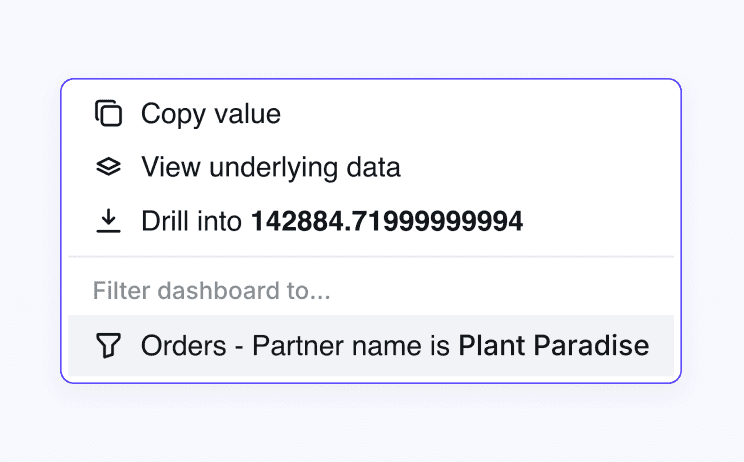
Every number is a starting point, not a dead end.

Cross-filter

Click any value to filter every other chart on the dashboard at once.

Drill in

Break a metric down by dimension, or open rows for a number.

Explore from here

Jump from a chart straight into a full query, without losing your place.

Date Zoom

Switch any chart from daily to weekly to fiscal-quarter in a click.

Scheduled deliveries

Send a dashboard on a schedule with the right filters already applied.

AI bubbles

Run queries by asking embedded agents questions in plain English.

Every number is a starting point, not a dead end.

Cross-filter

Click any value to filter every other chart on the dashboard at once.

Drill in

Break a metric down by dimension, or open rows for a number.

Explore from here

Jump from a chart straight into a full query, without losing your place.

Date Zoom

Switch any chart from daily to weekly to fiscal-quarter in a click.

Scheduled deliveries

Send a dashboard on a schedule with the right filters already applied.

AI bubbles

Run queries by asking embedded agents questions in plain English.

Speed you can trust

Governed context layer

Every dashboard runs on your semantic layer where metrics are defined once, in code.

Verified content

Mark charts and dashboards as verified, so teams know which numbers to trust.

Locked down

Permissions follow every viewer, and your data never leaves the controlled environment to get an answer.

Speed you can trust

Governed context layer

Every dashboard runs on your semantic layer where metrics are defined once, in code.

Verified content

Mark charts and dashboards as verified, so teams know which numbers to trust.

Locked down

Permissions follow every viewer, and your data never leaves the controlled environment to get an answer.

"Lightdash helped us scale self-serve. It’s easy for business users to use and get answers by dragging dimensions, adding filters, and drilling into data."

Abdelmounim Boufous

Senior Data Analyst @ Stake

90%

of employees using Lightdash

100%

dashboards migrated

80%

fewer ad-hoc data requests

"Lightdash helped us scale self-serve. It’s easy for business users to use and get answers by dragging dimensions, adding filters, and drilling into data."

Abdelmounim Boufous

Senior Data Analyst @ Stake

90%

of employees using Lightdash

100%

dashboards migrated

80%

fewer ad-hoc data requests

Your questions, answered

Your questions, answered

For any other questions, reach out to our team.

Can non-technical business users explore dashboards without SQL?

Yes. Business users don't need to know SQL to explore in Lightdash: click to cross-filter, drill into a metric, view the data behind a chart, or change the date range. For anything beyond that, business users ask the embedded AI agent in plain English and get a governed answer in the same dashboard, no SQL required.

Can I embed Lightdash dashboards in my own product?

Yes. Embed governed dashboards into your own product or customer portal with iframe embedding or the React SDK. The permissions you've set follow every viewer, so each customer sees only their own data.

Are Lightdash dashboards version-controlled?

Yes. Lightdash manages charts and dashboards as code, so every change is tracked and reviewable in Git, and a bad change is one revert away. That makes it safe to give more people edit access, because anything that breaks can be rolled back.

Do I need dbt to use Lightdash?

dbt is the most common setup, and Lightdash builds its semantic layer inside your dbt project. You can also define the semantic layer in Lightdash YAML against your warehouse without dbt. Either way, every dashboard runs on governed metrics defined once, in code.

How do I know which dashboards and numbers to trust?

Every dashboard runs on your semantic layer, so metrics trace back to a single definition in code. Your data team can mark charts and dashboards as verified, so everyone can tell an official, approved number from a quick one-off exploration.

I have an infrequently asked question.

Great! We're always around to help. You can chat to us through the live chat on this webpage, or talk to us in our Slack community.

See it on your own data

Book a walkthrough, or jump straight into the live demo.

The question isn’t whether your BI can be cleaned up. It’s why you’re the one doing it.

If your semantic layer already lives in code, you’ve done the hard part. Let Lightdash keep it honest, so your team spends its time on the analysis only they can do.

Join our newsletter to be en-lightened

© 2026 Telescope Technology Limited. All rights reserved.

Join our newsletter to be en-lightened

© 2026 Telescope Technology Limited. All rights reserved.

Join our newsletter to be en-lightened

© 2026 Telescope Technology Limited. All rights reserved.