
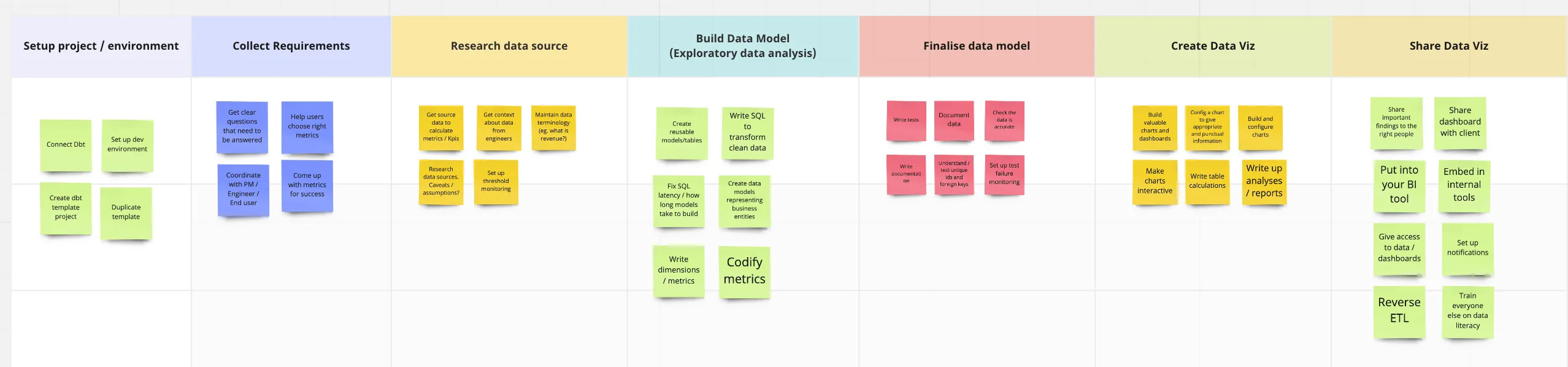
User journey mapping helped us uncover some really important problems our users were facing. 🕵️
One of my favourite product mantras is:
What problem is this solving?
If your product isn’t solving a problem, then it’s probably not a great product. So, to build great products, we need to be able to identify the problems our users are facing.
One tool we can use to do this is something called “user journey mapping.” The jist of it is that you define your users, map the jobs that they’re responsible for, then identify their biggest painpoints in completing these jobs.
And just like that, you’ve got a bunch of really relevant problems that you can be solving for your users.
In our last offsite, we did this at Lightdash. Not only did we identify a bunch of new problems we hadn’t thought about but we also learned a LOT about our users.
Over the next few months, we thought a lot about the “developer workflow” for analytics engineers.
We ended up trying to improve the experience of developing between dbt and your BI tool. We came out of this User Journey Mapping exercise all feeling quite similarly: the developer experience for data teams really sucks.
There are so many tools that don’t talk to each other, so much waiting around, and no way to really “check your changes”. So, we decided to take on a pretty big goal of “improving the developer workflow in Lightdash.” We’re excited to announce that it’s been launched today!
But, beyond this new and exciting feature release, we thought it might be useful for us to share how we got here using User Journey Mapping so that hopefully you can use it to help build better products too :)
Here’s a template for running a “User Journey Mapping” session with your team:
If you’re interested to hear a bit more then read on! We’ll go through each of the steps in more detail and talk about some examples of how this went for coming up with the “developer workflow” at Lightdash.
If you already know what you’re doing and just want to dig right into it, we’ve made a template for running a User Journey Mapping session with your team:
Running a User Journey Mapping Session
Who is the user? (10 minutes)
By the end of this, you should have a clear profile for the users you’re building for.
This is kind of like a “warm-up” for everyone to get into the same headspace and to make sure that we’re all on the same page with who we’re building for early on in the process.
You’ll split up into teams and each team will try to come up with a profile for your product’s user.
Some more questions that can help you are:
“What tools do they use?”
“Is there a single group/title that these people fall into? (e.g. corner stores, product managers, teenagers in Canada)”
“Who are this person’s ‘customers’?” (If talking about work-related tools)
“What does ‘success’ look like for them?”
By the end of this, you should have a clear profile for the users you’re building for. This can be bullet points or you can make them into an actual person with a name and a stock image. Go crazy.
Here’s an example of the user profile we came up with for one of our Lightdash users: an “analytics engineer”.

What are the user’s main ‘jobs to be done’? (20 minutes)
In this step, you’re going to come up with the jobs/tasks that your user needs to complete to be successful.
For example, if I were an analytics engineer some of my jobs could be:
Build data models
Get context about data from engineers
Fix SQL latency/how long models take to build
Write documentation
Setup test failure monitoring
We spend the first 10 minutes independently writing all of our ideas on sticky notes. Then, we come together, go over our notes, and group common themes for the last 10 minutes.
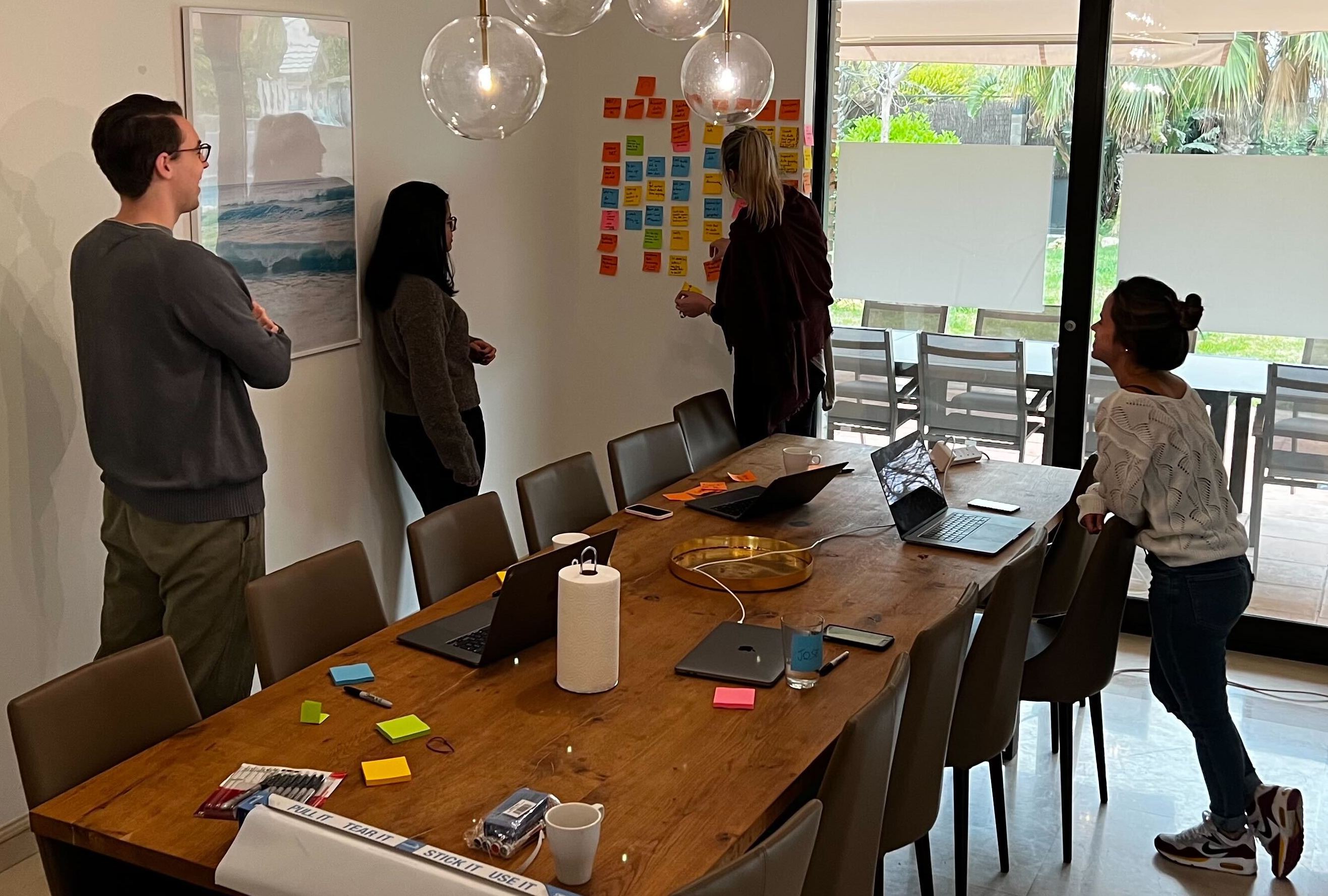
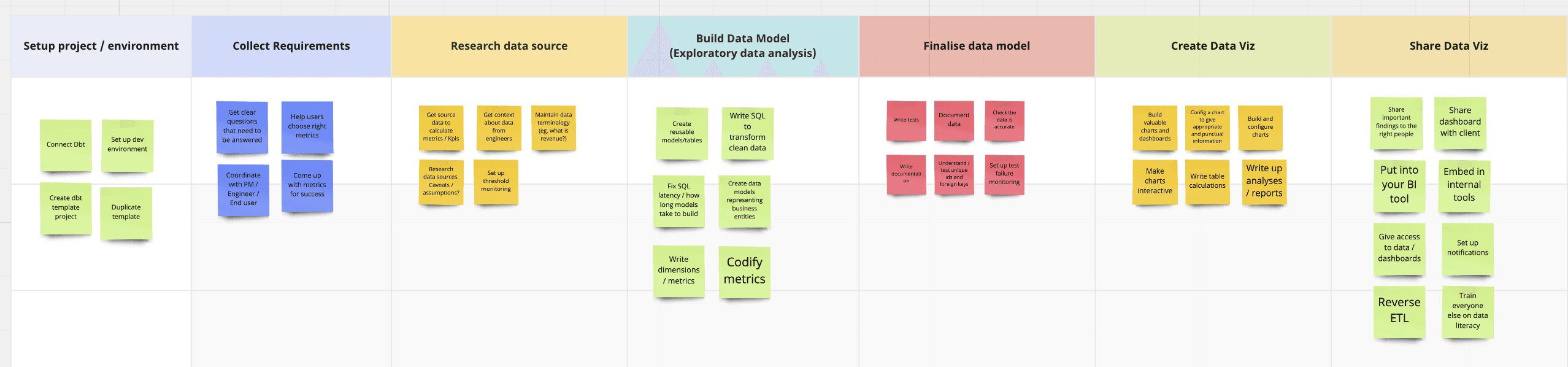
Here’s an example of the main user jobs we came up with for our “analytics engineer” user:
How are they currently trying to complete these jobs? (20 minutes)
By the end of this, you’ll have a bunch of actions and tools written out for your user’s most important jobs.
Depending on the number of job groups you came up with above, you can split into teams and focus on one or two of them, or split and conquer all of the groups.
Whatever you decide, the next thing to do is take our trusty sticky notes and come up with the actions our users take to complete these jobs. These steps don’t need to be too detailed, but you should try to include what tools they’re using.
For example, for analytics engineers’ job of “build data models”, we’d write steps like:
Figure out what are the join keys / the columns you need from your warehouse (data warehouse + maybe looking in your dbt project?)
Write your SQL (in a text editor or dbt cloud)
Check that your SQL runs (in dbt or BigQuery SQL Editor)
Fix broken SQL (in Google BigQuery or some other SQL runner with a linter)
Check the output table (preview in BigQuery/data warehouse)
Commit + merge your changes to GitHub
Rerun the data models in dbt in prod
By the end of this, you’ll have a bunch of actions and tools written out for your user’s most important jobs.
Here’s all of the steps and tools that we actually came up with for “build data models”:

What are the pain points? (30 minutes)
After this exercise, you should have a list of the biggest pain points that your users run into in completing their jobs and you should know at which steps they’re running into these.
Once you have all of your actions written down for your user’s job(s), you’ll go through them as a team and talk about the things that suck in this current workflow (a.k.a. pain points).
Pain points tend to fit into 4 groups, so you can keep these in the back of your mind while you’re trying to come up with some examples:

(source: https://www.revechat.com/blog/customer-pain-points/)
After this exercise, you should have a list of the biggest pain points that your users run into in completing their jobs and you should know at which steps they’re running into these.
For example, for analytics engineer’s job of “build data models”, we’d write steps like:
You’re switching between too many tools - it’s time consuming!
There’s no way to check that your SQL will run in your text editor.
The link between “changing something in dbt” and “seeing it in your BI tool” is really complicated (error-prone and time-consuming).

Where do we come in? (20 minutes)
At the end of this exercise, you should have split up your pain points between “ones we could improve” vs. “ones were not going to try to improve”.
Okay, we’re at the end now. We’ve got our user profile, their jobs, and their pain points. The final step is to ask ourselves: “where do we come in?”
More specifically, we’re going to go through all of the pain points as a team and decide if trying to fix these is in or out of scope for our product. You might have some ideas for how to fix these too! Feel free to pop those ideas onto sticky notes and add them in (but it’s not required).
At the end of this exercise, you should have split up your pain points between “ones we could improve” vs. “ones were not going to try to improve”.
For example, with the pain points in “build data models”, we decided that any of the ones happening in dbt were out of scope for us to improve (since trying to improve dbt would probably not be the best use of our time).
We used check/cross emojis to indicate this, then we wrote some ideas on what we might be able to do to actually improve the relevant pain points:
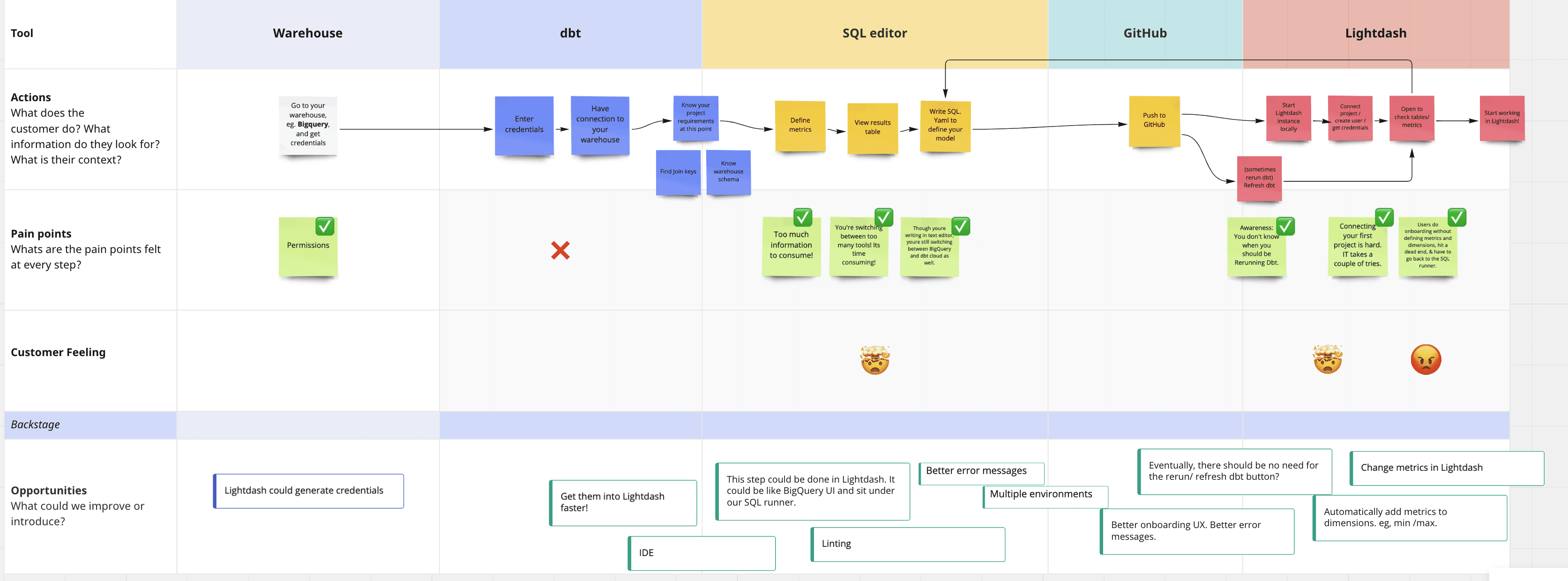
Now, you have a list of really relevant problems to solve and opportunities where you could make improvements
Once you’ve completed all of the steps in mapping your user journey, you’ll end up with a list of pain points that you can improve for your users. This is the ideal starting point for deciding on what you want to work on next that will have a big impact on your users.
It can be a bit overwhelming to just have a list of problems that all seem super relevant - where do you even start? If you’re feeling a bit like this, I’d highly recommend checking out the RICES framework that we use at Lightdash to prioritize the ideas we come up with during planning. This can help you decide on which ideas are the most relevant and have the highest impact so you can start working on them first.
And that's all we've got on User Journey Mapping! We hope that this approach is helpful to some of you in trying to solve your next big product problem. If you're interested in learning more about how we're building Lightdash, come and join us in the new Lightdash Community Slack (it's where all the juicy product secrets are shared 🤫).
Ready to free up your data team?
Try out our all in one open, developer-loved platform.